
Why Choose an Industrial Motherboard for Your Business?

Why Choose an Industrial Motherboard for Your Business?

Choosing an Industrial Motherboard is a business decision, not merely a hardware upgrade. In factories, transport systems, medical equipment, and outdoor kiosks, computers face vibration, dust, heat, and unstable power. A consumer board may work well on a desk. It may struggle beside a production line.

Industrial systems also demand long product availability. A sudden component change can disrupt testing, certification, maintenance, and customer commitments. Hannes Niederhauser, CEO of Kontron, has stated, “Long-term availability is a key requirement for our customers.” This principle explains why industrial boards often support extended lifecycles, controlled revisions, and documented component choices.

Reliability matters.

A well-selected Industrial Motherboard can provide wider temperature support, stronger connectors, remote monitoring, and multiple expansion options. These features help engineers manage real conditions, such as a cabinet reaching 55°C or a machine restarting after a voltage dip. However, industrial hardware is not automatically the right answer. It can cost more, require careful thermal planning, and offer features your application never uses.

That is the uncomfortable part. More protection does not fix poor system design. Buyers should examine processor longevity, operating temperature, storage interfaces, BIOS support, certifications, repair access, and supplier responsiveness. They should also test the board inside the intended enclosure, not only on a laboratory bench.

The right choice depends on risk. When downtime is expensive, an Industrial Motherboard can protect continuity and simplify future maintenance. When requirements are modest, a carefully selected commercial board may be sufficient. A responsible decision begins with evidence, not impressive specifications.
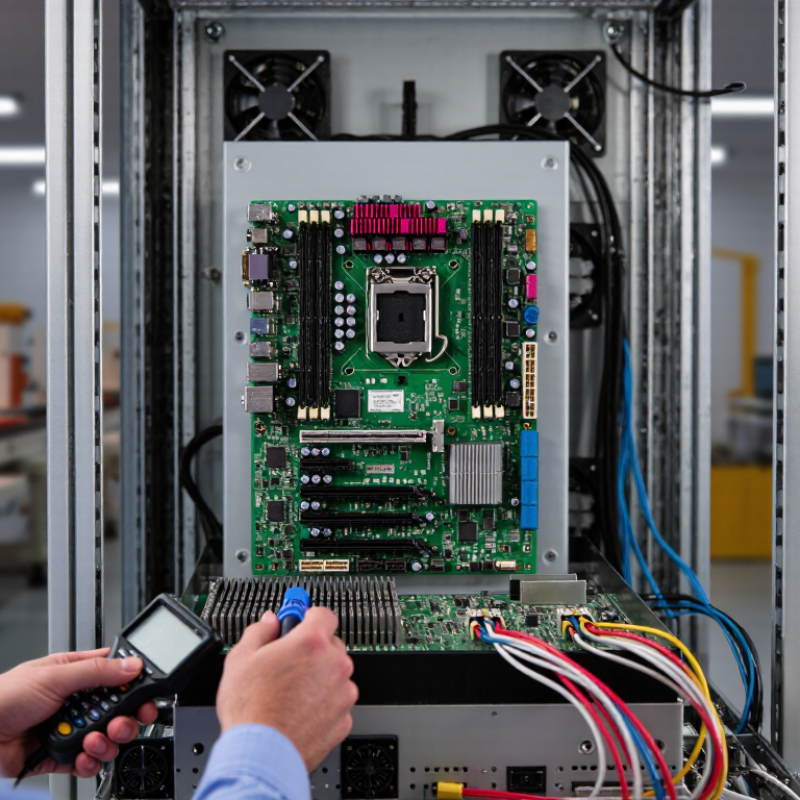
Why Choose an Industrial Motherboard for Your Business?

What Is an Industrial Motherboard?

An industrial motherboard is the central circuit board built for demanding, long-running equipment. It connects the processor, memory, storage, expansion cards, sensors, and network interfaces. Unlike a consumer desktop board, it often supports wider temperature ranges and continuous operation.

It may include reinforced connectors, stable power regulation, watchdog timers, and protection against vibration or electrical noise. These features matter inside factory controllers, medical equipment, transportation systems, and outdoor kiosks. In practical deployments, a loose connector can stop an entire machine. A secure design helps prevent that interruption.

Long product availability also matters. A business may need the same board for several years, rather than replacing hardware after one sales cycle. Technical teams should check processor support, expansion slots, operating system compatibility, and remote management functions. They should also review thermal performance under the actual enclosure conditions. Laboratory results can look excellent. Field conditions are less forgiving.

An industrial motherboard is not a magic shield. Dust, poor airflow, unstable power, and incorrect installation can still cause failures. I have found that maintenance planning is often treated as an afterthought. That is a mistake worth examining. Reliable operation depends on the board, the enclosure, the software, and the people maintaining the system.

How Industrial Motherboards Differ from Consumer Models

Why Choose an Industrial Motherboard for Your Business?

Industrial motherboards differ from consumer models in design, testing, and expected service life. A consumer board may suit an office desktop with stable temperature and occasional use. Industrial hardware is built for machines that operate continuously, sometimes in dusty workshops or remote cabinets. It often supports wider temperature ranges, stronger vibration resistance, and longer component availability. That stability can reduce unexpected maintenance and production delays.

The differences appear in small details. Industrial boards commonly provide reinforced connectors, watchdog timers, controlled power recovery, and multiple expansion options. These features help a system restart safely after a power interruption. Some models also support legacy interfaces required by factory equipment. In field evaluations, reliable communication ports mattered more than impressive processing speed. However, industrial protection is not magic. Poor airflow, incorrect wiring, or unsuitable power supplies can still cause failure. The design choice needs careful testing.

Tips: Check the operating temperature, mounting method, port requirements, and expected replacement period. Test the motherboard inside the actual enclosure, not only on a workbench. Leave room for airflow and service access. Document BIOS settings before deployment. A higher purchase cost may be reasonable, but only when it matches the machine’s real workload. Over-specifying hardware wastes budget, while choosing a consumer board may create difficult replacements later.

Which Business Challenges Can They Solve?

Why Choose an Industrial Motherboard for Your Business?

Which Business Challenges Can They Solve?

Industrial motherboards help businesses reduce downtime in demanding operating conditions. They support continuous workloads in factories, kiosks, transport systems, and inspection equipment. Many models tolerate dust, vibration, temperature changes, and long operating hours. This matters when restarting a system could stop a production line. A stable platform also simplifies maintenance because teams can use consistent components across several machines.

These boards can solve lifecycle and integration problems, too. Commercial computers may change quickly, forcing costly redesigns. Industrial platforms often offer longer product availability and controlled revisions. They may also provide multiple expansion slots, serial ports, network interfaces, or display outputs. This supports older equipment and newer sensors in one system. However, compatibility is never automatic. A board can meet the specification and still fail inside a poorly cooled cabinet.

Tips: Check operating temperature, power input, connector placement, and expansion needs before purchasing. Test the complete system under heat, vibration, and peak workload. Keep replacement units available for critical installations. Documentation should be clear enough for another technician to follow. This is often overlooked. Also review firmware support and security update procedures with the supplier. An industrial motherboard is not a magic fix, but careful selection can make business systems easier to repair, scale, and trust.

How to Evaluate Reliability, Performance, and Compatibility

An industrial motherboard earns its place through measurable reliability, not a rugged-looking enclosure. In plant trials, engineers should check operating temperature, vibration resistance, dust protection, watchdog recovery, and storage endurance. IEC 60068 test methods provide a useful framework for environmental testing. Request complete test conditions, not only an MTBF figure. MTBF can look impressive while ignoring thermal cycling or maintenance habits.

Performance must reflect the real workload. Measure sustained CPU usage, memory error correction, storage latency, and I/O response during peak operation. A 2024 Deloitte manufacturing survey reported that 86% of leaders view smart manufacturing as important for competitiveness. That ambition increases the need for stable edge computing. Short benchmarks can mislead. Run applications continuously, with cameras, sensors, and network traffic connected. Watch for throttling.

Compatibility often causes the quietest failures. Confirm processor architecture, operating-system support, PCIe lane allocation, display outputs, network protocols, power input, and mounting dimensions. Check whether the board supports the required fieldbus or serial interfaces without extra converters. Also examine firmware update methods and the expected availability period. The Industrial Internet Consortium stresses interoperability and lifecycle planning in industrial systems guidance. A compatibility matrix helps. It is not perfect. Some factory noise, aging cables, and unusual startup sequences appear only after installation. Leave room for those surprises.

Why Choose an Industrial Motherboard for Your Business? - How to Evaluate Reliability, Performance, and Compatibility
Evaluation Dimension Practical Industrial Benchmark How to Evaluate It Business Value
Operating Temperature Select an extended-temperature design when equipment must operate beyond the typical commercial range of approximately 0°C to 70°C. Common industrial requirements include approximately −20°C to 70°C or −40°C to 85°C, depending on the application. Check the manufacturer’s tested operating range and verify whether the rating applies to the complete system, processor, memory, storage, and power supply. Reduces thermal shutdowns in outdoor cabinets, factory equipment, transportation systems, and unconditioned spaces.
Expected Service Life Prefer a product family with a documented availability commitment of at least 5 years when redesigning deployed equipment would be costly. Review the stated product life-cycle policy, change-notification process, repair policy, and replacement strategy. Improves consistency across long-running projects and reduces unexpected redesign and requalification costs.
Reliability Data Use published MTBF only as a comparative indicator; MTBF values are model- and condition-dependent and are not a guaranteed operating lifetime. Request the calculation method, ambient temperature, load profile, component assumptions, and applicable reliability standard or methodology. Supports risk assessment without treating a single headline reliability number as a warranty.
Vibration and Shock Resistance For mobile or high-vibration installations, look for documented testing based on recognized environmental test methods, such as IEC 60068-2-6 for vibration and IEC 60068-2-27 for shock. Compare test frequency, acceleration, duration, mounting method, and whether the complete assembled system was tested. Helps prevent connector loosening, storage failures, and intermittent faults in vehicles and industrial machinery.
Power Input and Protection Confirm the supported input range, startup behavior, overvoltage protection, undervoltage protection, reverse-polarity protection, and power-loss recovery behavior. Test the board with the actual power supply under minimum, nominal, and maximum input conditions, including transient events where applicable. Improves stability in electrical environments with voltage fluctuation or frequent power interruption.
Processor Performance Choose performance based on workload: control applications may prioritize deterministic response, while vision, analytics, and edge AI require higher CPU or accelerator capacity. Benchmark the complete software stack using the intended workload, thermal enclosure, operating system, and peripheral configuration. Avoids both under-sizing, which causes delays, and over-sizing, which increases cost and power consumption.
Thermal Management Evaluate passive cooling, fan-assisted cooling, heat-spreader design, and throttling behavior at the maximum expected ambient temperature. Run sustained workloads and record processor temperature, clock frequency, power draw, and performance over time. Maintains predictable performance and reduces maintenance associated with fan failure or dust buildup.
Memory Capacity and Error Handling Verify maximum supported memory, module type, capacity per slot, and ECC support when data integrity is important. Confirm compatibility using the board’s qualified-memory list and test the intended modules under sustained load. Supports stable operation for databases, industrial vision, automation software, and edge computing workloads.
Expansion and I/O Match PCIe generation and lane count, serial ports, digital I/O, Ethernet ports, USB ports, display outputs, storage interfaces, and GPIO requirements to the system design. Create a port-by-port compatibility matrix, including electrical levels, connector types, bus bandwidth, and simultaneous-use limitations. Reduces the need for adapters and preserves integration space inside the enclosure.
Storage Compatibility Check support for SATA, NVMe, removable storage, boot mode, power-loss protection requirements, and the intended storage temperature rating. Test boot reliability, sustained read/write performance, power-cycle behavior, and file-system recovery with the selected drive. Improves data availability and helps prevent storage-related downtime.
Watchdog and Remote Management A hardware watchdog should be available when automatic recovery from software lockups is required. Remote monitoring may include health status, temperatures, voltages, and fan speed. Simulate application freezes, operating-system crashes, network loss, and power recovery to verify automatic restart behavior. Reduces on-site service visits and shortens recovery time for unattended equipment.
Operating-System and Driver Support Confirm support for the required operating system version, kernel, device drivers, real-time requirements, BIOS functions, and security features. Validate all interfaces and peripherals on the exact software image used in production, not only on a development computer. Prevents delays caused by missing drivers, unsupported firmware, or unexpected operating-system behavior.
Mechanical Integration Verify board size, mounting-hole pattern, connector placement, keep-out zones, heat-sink height, cable clearance, and enclosure airflow. Use a mechanical drawing or 3D model and perform a physical fit check with all installed modules and cables. Reduces assembly changes and prevents interference inside compact industrial enclosures.
EMC and Regulatory Testing The final product should be evaluated against the regulations and standards applicable to its market and installation environment; board-level compliance does not automatically certify the complete system. Review available test reports and plan system-level electromagnetic compatibility, safety, and emissions testing with the final enclosure and cables. Supports regulatory approval and lowers the risk of field interference or failed certification.
Lifecycle and Change Control Prefer documented revision control, PCN or EOL notifications, component traceability, and a defined replacement process. Ask how hardware revisions, BIOS changes, processor substitutions, and discontinued components are communicated and validated. Protects long-term compatibility and simplifies maintenance across large deployments.
Total Cost of Ownership Compare purchase price together with engineering, certification, integration, maintenance, downtime, replacement, and redesign costs. Build a multi-year cost model using expected deployment quantity, service interval, failure impact, and product availability period. Shows whether a higher initial investment produces lower operating and support costs over the deployment life.

When Should a Business Choose an Industrial Motherboard?

When Should a Business Choose an Industrial Motherboard?

An industrial motherboard becomes practical when failure costs more than its purchase price. IoT Analytics reported approximately 14.3 billion connected IoT devices in 2023. Many now operate near machines, sensors, and inspection cameras. That growth increases demand for dependable edge computing.

A factory floor may expose hardware to vibration, dust, electrical noise, and temperature changes. A fanless design, wider operating temperature range, watchdog timer, and long-term component availability can reduce service interruptions. Not every workstation needs it.

Choose this platform when the system must run continuously, support legacy interfaces, or remain maintainable for seven years or longer. Multiple serial ports, digital I/O, fieldbus expansion, ECC memory, and remote monitoring can matter more than peak benchmark scores.

NIST SP 800-82 Rev. 3 emphasizes availability, integrity, and controlled maintenance in operational technology environments. Those principles fit production lines, traffic systems, medical equipment, and unattended kiosks. Check the cabinet first. A board rated for vibration still needs proper mounting and cable relief.

Reliability data also deserves attention. The Uptime Institute’s 2023 Global Data Center Survey found that 60% of respondents experienced an outage within three years. Industrial settings are not data centers, but the lesson remains relevant: downtime needs a price.

Industrial hardware is not automatically the right answer. It may increase cost, power use, and design complexity. A careful engineer should compare environmental limits, replacement plans, software support, and failure consequences. I would still leave room for doubt. A premium board cannot repair poor grounding or weak maintenance procedures.